Enabling Dopamine-Aware Browsing
Premise
In my life, I find myself often in a situation where I feel some special interest in my relation to, my habits of consumption of and my relationship with media. I always think back to “simpler” times when I actually managed and enjoyed to read books. Not only after reading the book “Dopamine Nation” by Anna Lembke I think more than ever that nowadays, excessive engagement in “low-effort but high-dopamine”-activities (e.g. doomscrolling, video games) is the modern variant of “smoking in the seventies”.
The Problem
Living our life with the social media platforms around us, there’s little agency that we can excert when it comes to the ways of their usage. The truth is that platforms like Instagram are here to stay and while we - of course - could stay away of them completely (and thus “solve” the problem), we might want to look out for a more moderate approach that still enables us to take part in society; or: where our sub-society of choice plays. And this might be on Instagram. Or Youtube. Or any other social media platform. Abstaining from these platforms can and will lead (in my experience) to social isolation. The problem is, that they are less of “neutral platforms” and more of designed environments which make us the player in a game that a) we did not consciously sign up for and b) we are forced to play by their rules. What I mean by that is that there’s an ever increasing divergence between why we think we are visiting the platform and the interest that the platform owners have. We might be thinking that we visit Instagram in order to keep up to date with our friends, yet we stay for the immense dopamine-hits. And there are less and less ways around that. Just recently I restarted using Instagram and could not help but notice that auto-playing videos are omnipresent. Immediately upon opening either the app or the website you will get a video (/ “short” / “reel”) playing in your face. Not surprising: you will not find any possibility to deactivate the auto-play feature. You are forced to consume the app’s algorithm-curated and hyper-personalized content in this friction-less, unsolicited “feeding”. Staying in the “smoking in the seventies”-metaphor: we are forced to sit in a room filled with smoke.
The Solution
In this post I want to talk about some little tricks that I have found to be very effective in giving us back a little of agency.
What this post shows is how you can disable videos in the Instagram feed as well as make youtube really only be a video-playing platform; removing suggestions and comments from youtube videos.
We will do that by the power of extending the original use case of adblockers and turning them into an empowering tool of control against the design of these services.
Prequisites
- using the browser-versions of the services
- using the Brave browser¹
What we need to set up
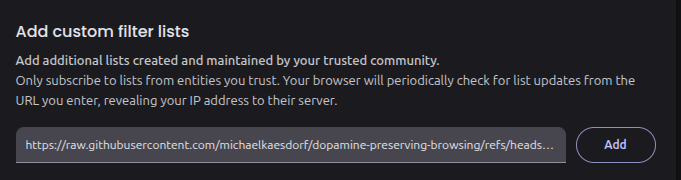
In the Brave browser’s settings, visit the filter settings; you can do that via this url: brave://settings/shields/filters. There you can paste this url to my dopamine-preserving-filter-list as a custom filter list. Like this you will make sure to subscribe to my personal filter list that I keep up to date and functioning if something breaks.
Or you set your filters manually: Then, we will set a custom html filter. You can do that and scrolling down to the custom filters section:
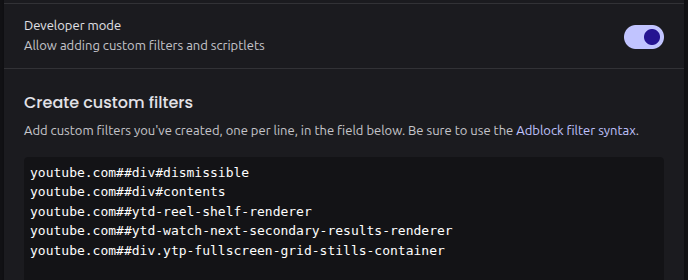
There you can paste the following:
! Hides video elements on Instagram that are not in stories
Instagram.com##article video

! Hides most of youtube's recommendations (like shorts etc)
youtube.com##div#dismissible
youtube.com##ytd-reel-shelf-renderer

! Hides the "Watch Next" / suggested videos sidebar on the YouTube watch page
youtube.com##ytd-watch-next-secondary-results-renderer

! Hides the grid of video preview thumbnails shown when hovering or scrubbing in fullscreen
youtube.com##div.ytp-fullscreen-grid-stills-container

! Hides the YouTube comments section entirely
youtube.com##.ytd-comments
Enjoy!
¹: or any other browser with adblock capabilities that work with adblock/uBlock origin syntax