Deploying Hermes Agent via Helm Chart
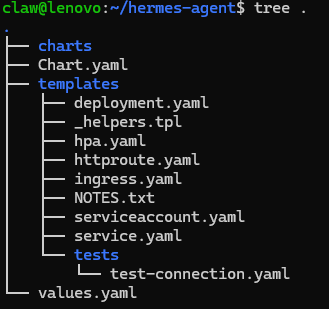
Now, after some experimentation with Hermes and OpenClaw, I thought the next smart step would be to think about how to deploy it more safely (and flexibly!). You know what made me think that? The fact that the mental model of Hermes might not align so well with multi-agent thinking. So I thought: why not create a set-up where you can spin up a new Hermes agent quickly? And anyway, there’s always something valuable to learn if you dive into kubernetes stuff (at least for me).
So, the current idea is so install k3s on my lenovo x230 minimal debian 13 server. Then install helm and create our own helmchart. So we simulate more of a production scenario.
So, we create our own helm chart:
helm create hermes-agent
cd hermes-agent
And then we directly install it:
helm install hermes-test .
Verify if it landed:
kubectl get pods

Looking good! So let’s remove it for now again:
helm uninstall hermes-test
As a small reminder in between:
Q: There is a nousresearch/hermes-agent Docker image. What benefit do I get from wrapping a Helm chart around it?
A: The Helm chart let’s me redeploy the agent easily and quickly. it is helping me to consistently handle variables and secrets, kubernetes style. Goal is: be able to spin up a new hermes agent quickly and safely. Also, in the long stretch, I want to experiment with the interplay between hermes and oauth. So I will probably deploy a keycloak as well. And kubernetes is great to give me some plug-and-play experience here.
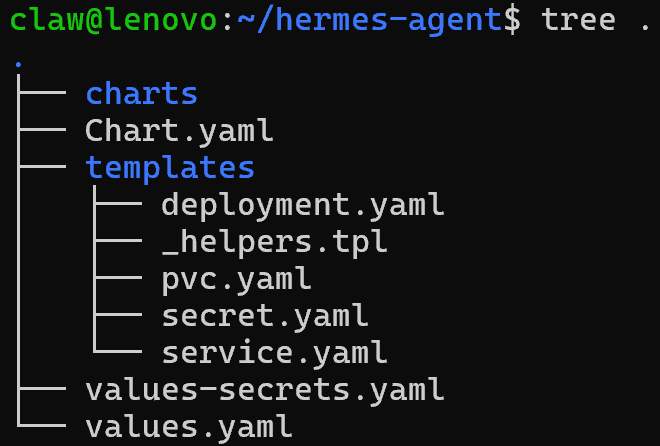
So - back to the good stuff. The current tree of the chart looks like this:
I will upload the chart as soon as it is finished for you to download if you like.